
All case studies

DWG · 10 · Equipment & Rentals

Modernizing a formal-wear rental system

We replaced a single-PC Windows rental application with a cloud system for simultaneous staff access, rental status, overdue items and cleaning fees.

Before

Existing work

  • Single-PC Windows rental application
  • Staff access limited by Remote Desktop
  • Inventory status and customer history on one hard drive
  • Manual overdue-item and cleaning-fee tracking

Portal · Formal-wear rental business

Modernizing a formal-wear rental system

  • Cloud-based rental management for simultaneous access
  • Customer, rental, garment and payment records
  • Rental and garment status updates after returns
  • Inventory availability, overdue items and cleaning fees
  • Role-based access for administrators and staff
DWG 10
Label Equipment & Rentals
Rev A
Sheet 01

Inside the system

Screens shown with sample data.

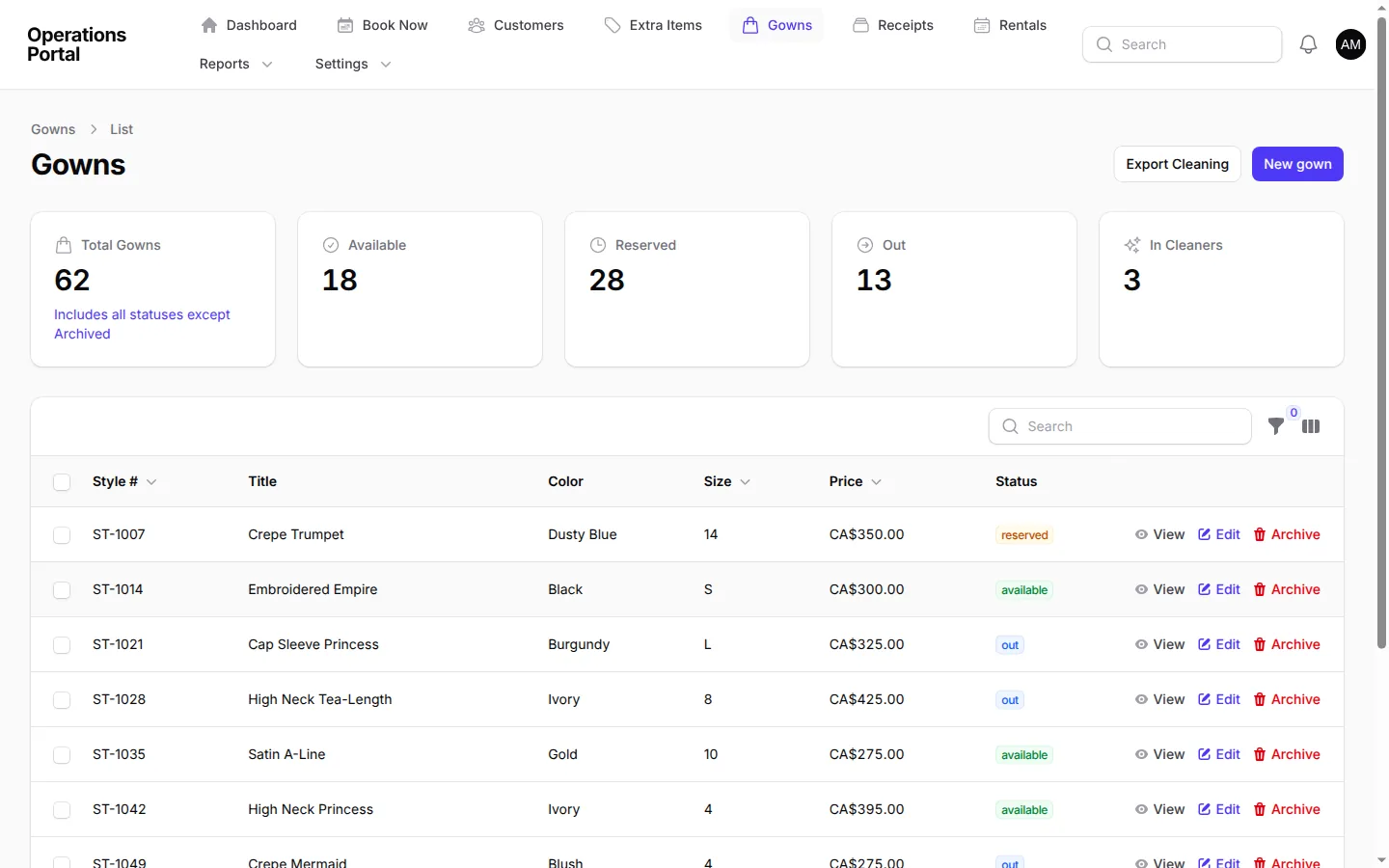
DETAIL A Product screen
Inventory overview with every gown's status: available, reserved, out or at the cleaners.
A. Inventory overview with every gown's status: available, reserved, out or at the cleaners.
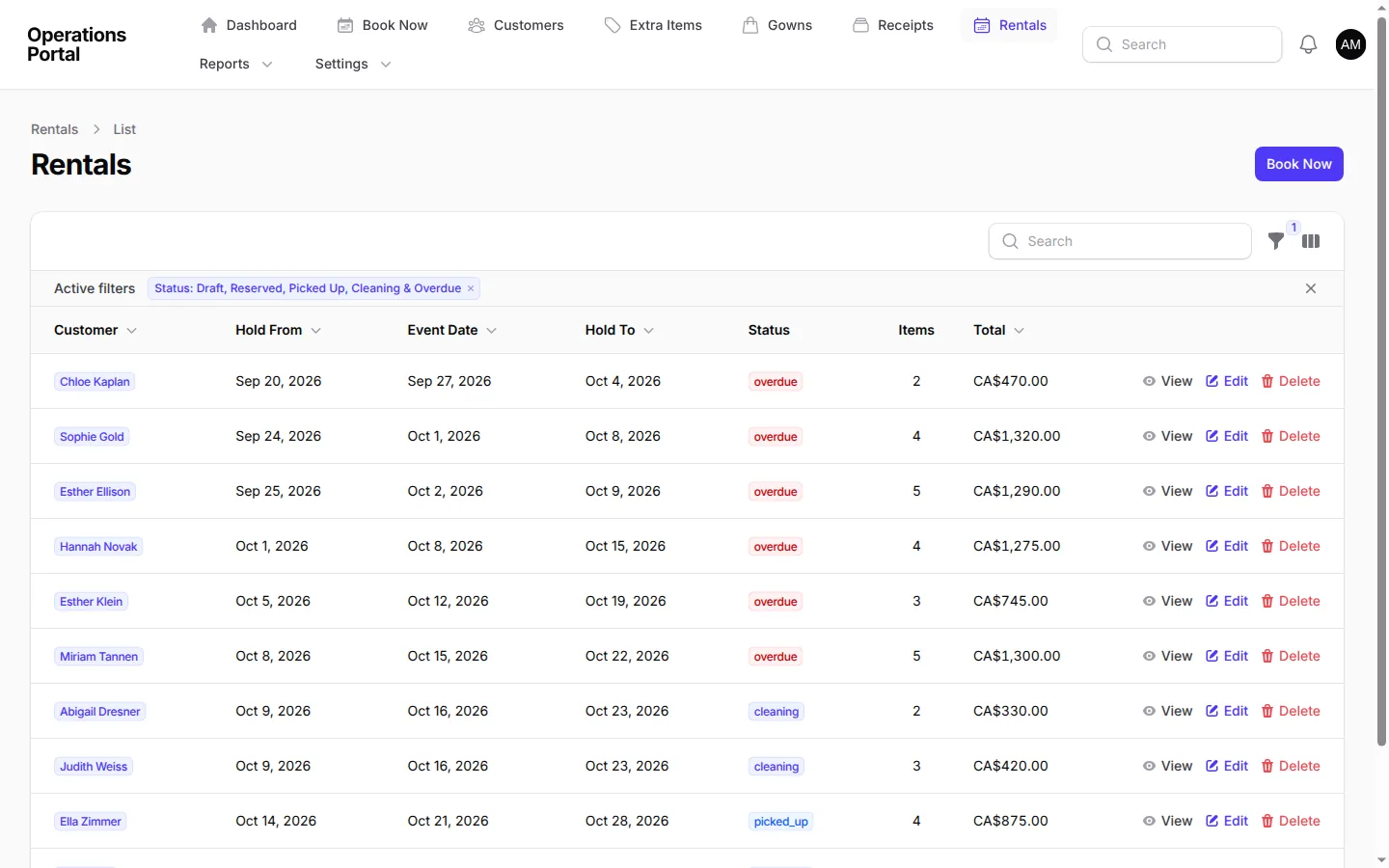
DETAIL B Product screen
Active rentals, with overdue bookings sorted to the top.
B. Active rentals, with overdue bookings sorted to the top.
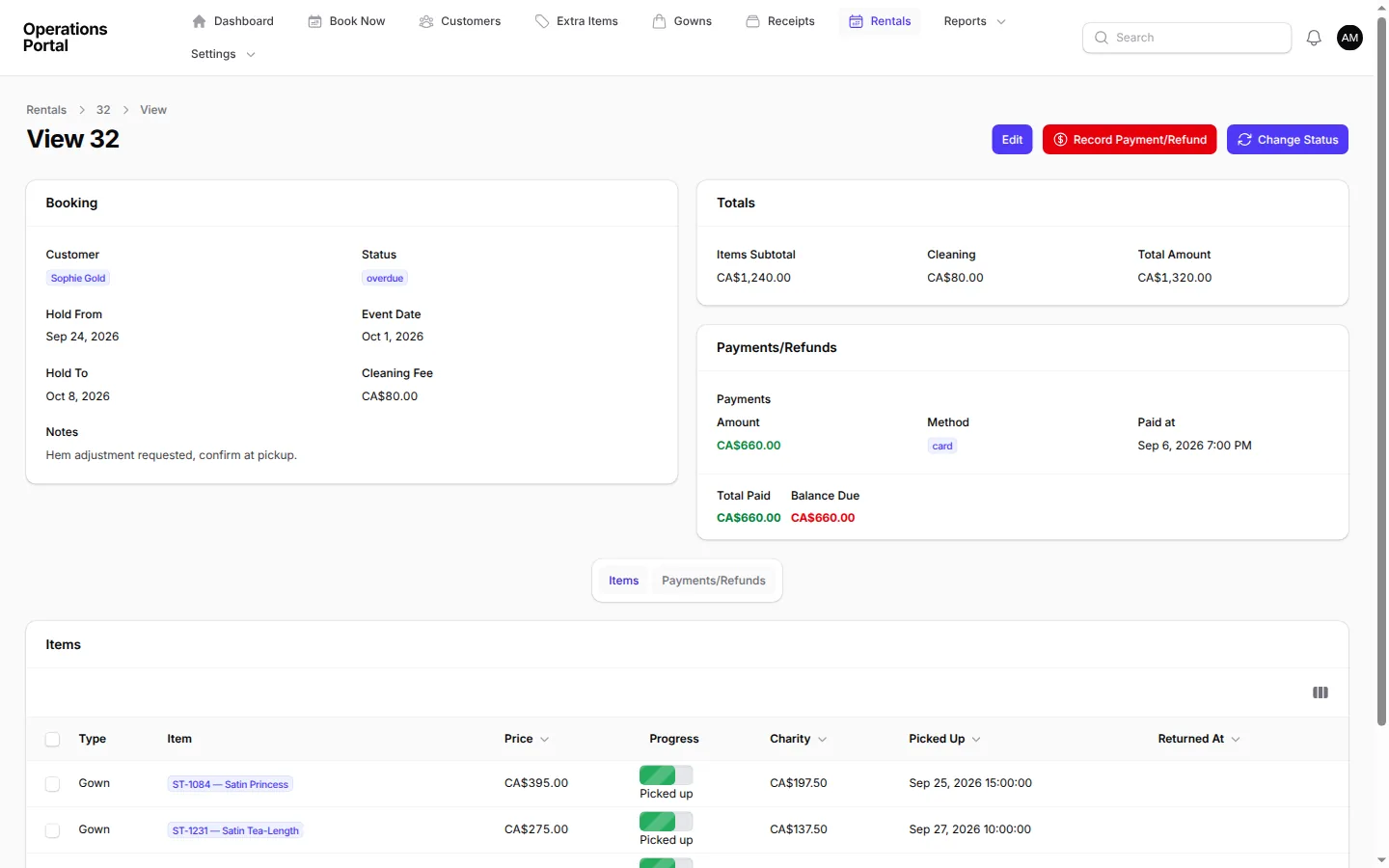
DETAIL C Product screen
A rental record showing items, cleaning fee, payments and balance due.
C. A rental record showing items, cleaning fee, payments and balance due.

Challenge

A formal-wear rental business ran its operation on an off-the-shelf application installed on one Windows computer. Staff could not work in the system at the same time. Remote access meant logging into that physical machine through Remote Desktop, which locked out anyone using it locally.

Inventory status, customer history and financial information were stored on one hard drive. Staff also entered overdue-item flags and cleaning fees manually. That made it difficult to see current garment availability, coordinate bookings and keep rental records consistent as customers and staff worked across the business.

What we built

We replaced the single-PC application with a cloud-based rental system that staff can use simultaneously from iPads, laptops and phones. The system brings customer, rental, garment and payment records into a web application. Filament provides the staff interface for working with detailed records, tables, filters and forms.

Rental and garment statuses move with the work. When staff mark a rental returned, garments can move into Cleaning and the rental can close once every item is back. The system updates inventory availability so staff can see whether a garment can be booked again. The workflow also brings overdue items and cleaning fees into the rental records instead of leaving those tasks to manual entry.

Role-based access separates administration from standard staff work. Administrators can manage global settings, while staff focus on bookings and returns. The database connects customers, rentals, garments and payments so a booking has the information needed for day-to-day service.

How we worked

We brought the density of the desktop workflow into a responsive web interface rather than simplifying away the operational detail staff relied on. Tables, filtering and forms support booking and return work, and the data model ties customers to their rentals, garments and payments.

We connected status changes to the actions staff take. A return updates the rental and garment records, and availability follows the garment's current status. This keeps booking work aligned with returns and cleaning. Administrators and staff each have access suited to their responsibilities, and the system can be used from multiple devices without one person locking others out.

Administrators can configure global settings, while standard staff focus on bookings and returns. Staff can handle these tasks simultaneously across devices without one person locking out a colleague.

Result

Staff can access the rental operation from multiple devices at the same time, check garment status and see availability as items move through bookings, returns and cleaning. The system tracks overdue items and cleaning fees in the rental workflow, and returned garments move into Cleaning while completed rentals close when every item is back. Customer, rental, garment and payment information now lives in one cloud application.

The first step is a conversation

Have a similar system?

Tell us how you work today.

Tell us how you work today Custom web development services
DWG 10
Label Equipment & Rentals
Rev A
Sheet 02

Related work

More case studies

All case studies

DWG · 11 · Healthcare

Order management for a specialty medical distributor

We built a platform for serialized biologics inventory, provider self-service, patient documentation, commissions, returns and order payments.

Before

  • Serial numbers tracked manually across inventory
  • Patient and clinical documentation separate from orders

Portal

  • Serialized inventory from receipt through patient application
  • Provider self-service for orders and patient records
  • Clinical documentation and prior-authorization status
Read case study

DWG · 12 · Field Service

Order management connected to email

We connected monitored email folders to an order portal that captures replies and moves work through New, Quoted, In Progress, Complete and Billed.

Before

  • Customer inquiries and orders arrived by email
  • Quotes and project status were tracked in email threads

Portal

  • Monitored folders create orders from incoming emails
  • Original messages and replies are linked to each order
  • New, Quoted, In Progress, Complete and Billed stages
Read case study

DWG · 1 · Distribution & Wholesale

A connected ERP for a wholesale distributor

We replaced a legacy desktop ERP with a portal for purchasing, receiving, inventory, sales and department workflows, connected to third-party warehouse inventory snapshots.

Before

  • Legacy desktop ERP used across departments
  • Historical records held in CSV files

Portal

  • Purchase orders, vendor offers and vendor bills
  • Receiving, discrepancy reports and per-container cost baselines
  • Inventory lots with FIFO and average landed cost
Read case study