
All case studies

DWG · 1 · Distribution & Wholesale

A connected ERP for a wholesale distributor

We replaced a legacy desktop ERP with a portal for purchasing, receiving, inventory, sales and department workflows, connected to third-party warehouse inventory snapshots.

Before

Existing work

  • Legacy desktop ERP used across departments
  • Historical records held in CSV files
  • Warehouse inventory managed by a third party

Portal · Wholesale importer and distributor

A connected ERP for a wholesale distributor

  • Purchase orders, vendor offers and vendor bills
  • Receiving, discrepancy reports and per-container cost baselines
  • Inventory lots with FIFO and average landed cost
  • Sales proposals, orders, invoices, credit notes and closeout rules
  • Product compliance records, samples and customer-specific pricing
  • Incoming stock allocation and B2B buyer portal
  • Department dashboards, documents and activity log

Connected systems

Services that support the workflow.

  • 3PL WMS inventory snapshots
DWG 1
Label Distribution & Wholesale
Rev A
Sheet 01

Inside the system

Screens shown with sample data.

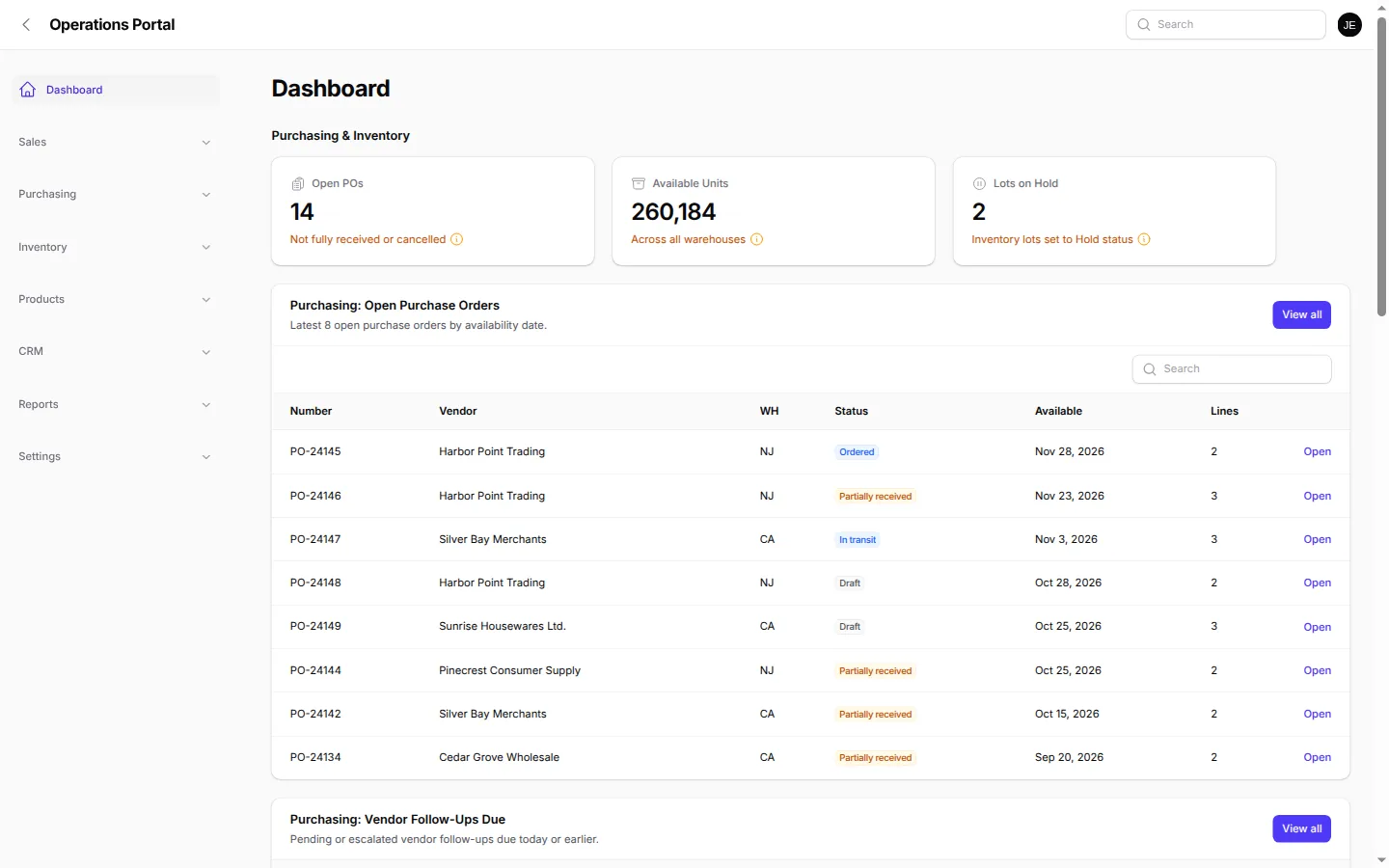
DETAIL A Product screen
Department dashboard with clickable purchasing and inventory stats.
A. Department dashboard with clickable purchasing and inventory stats.
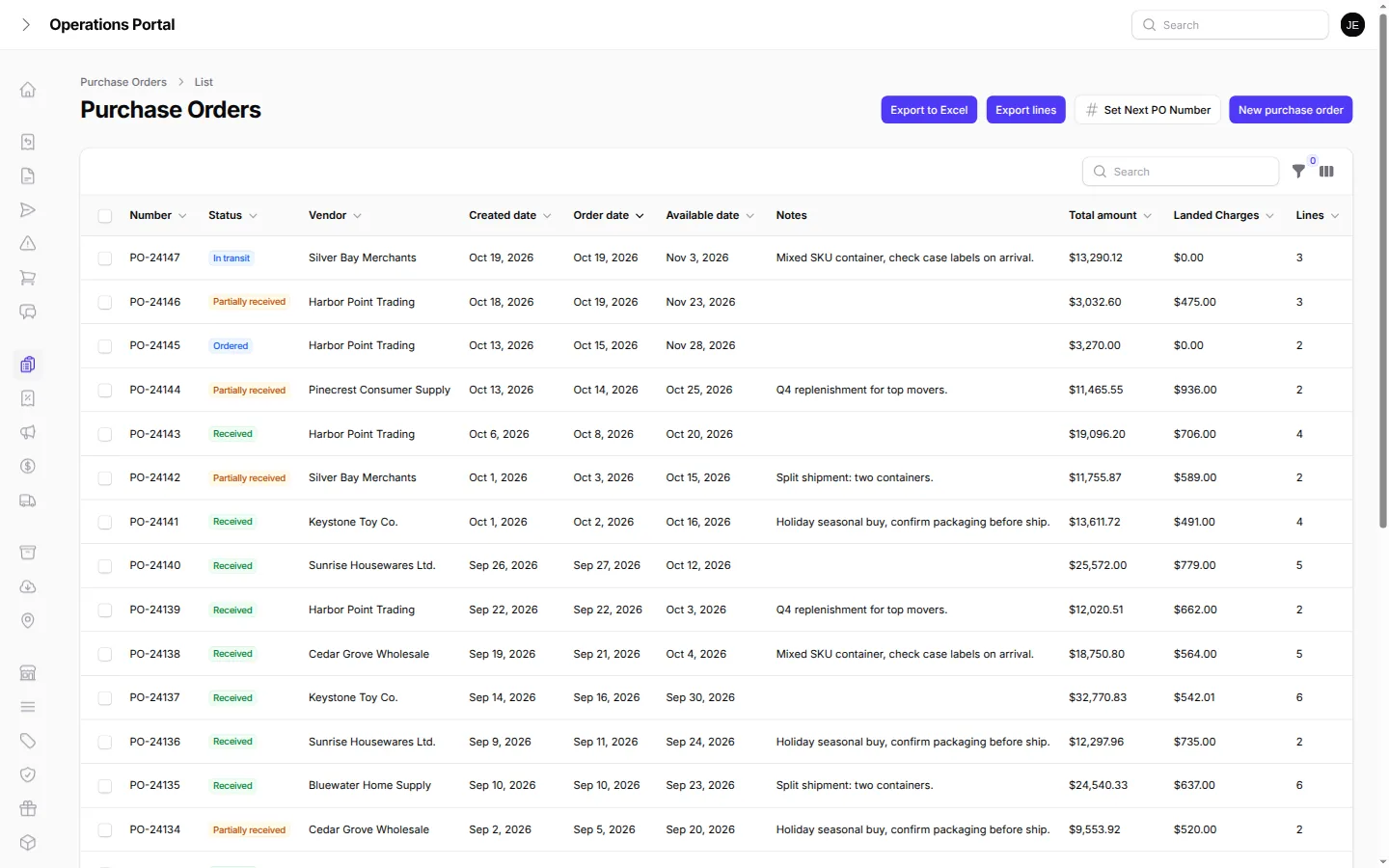
DETAIL B Product screen
Purchase orders with status, vendor, dates, totals and landed charges.
B. Purchase orders with status, vendor, dates, totals and landed charges.
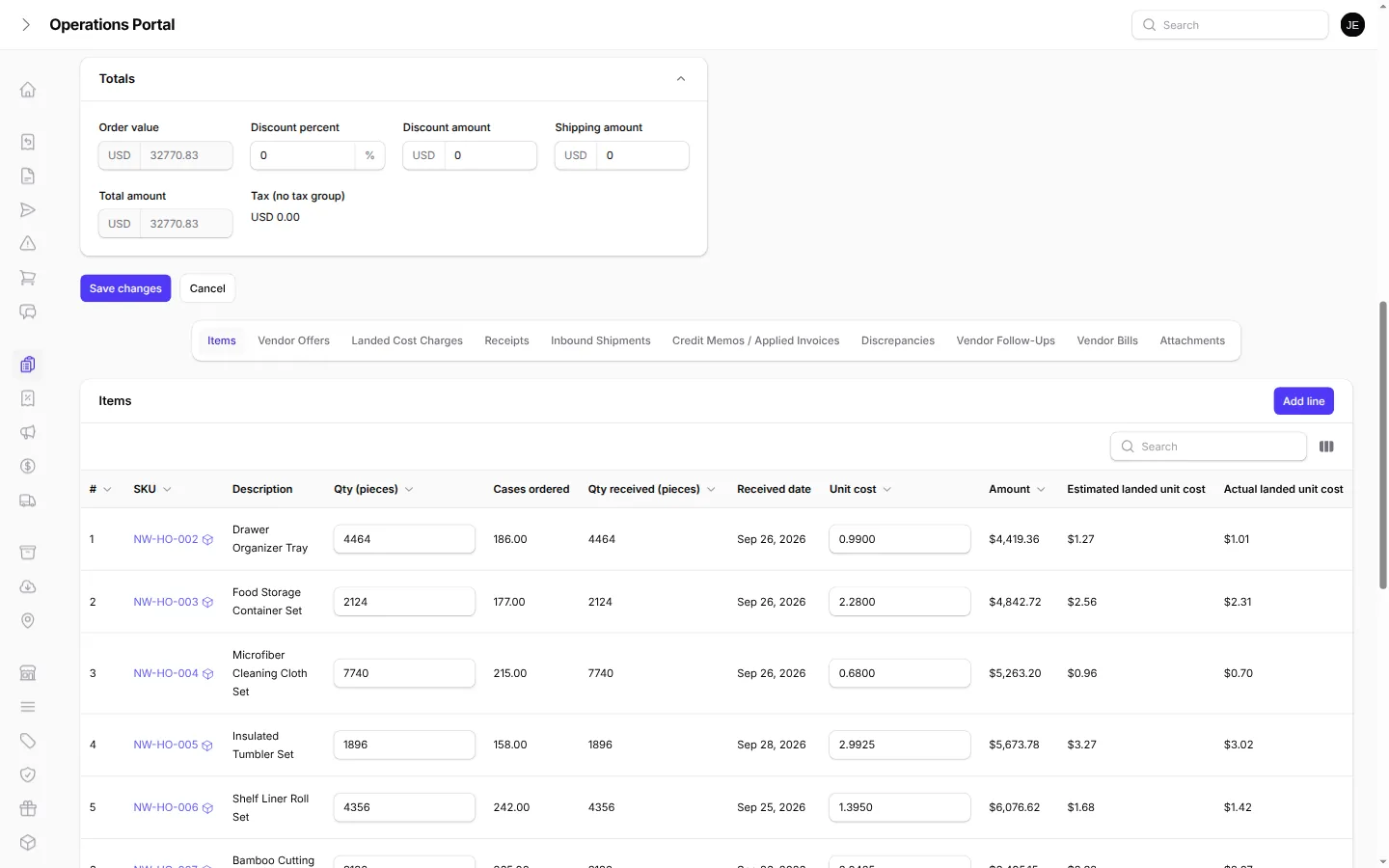
DETAIL C Product screen
Received PO lines comparing estimated and actual landed unit cost.
C. Received PO lines comparing estimated and actual landed unit cost.

Challenge

A wholesale importer and distributor needed to move beyond a legacy desktop ERP that staff had used for years. Purchasing, receiving, inventory, sales documents and customer-specific pricing all belong to the same business, but each department has its own work to manage. The replacement also needed to work with warehouse inventory held by a third-party logistics provider.

Historical records came from CSV exports. Inventory needed lot-level detail and support for FIFO or average landed-cost methods. Staff also needed a place to record receiving discrepancies, product compliance information, samples and the activity behind important changes. Replacing the old system meant connecting purchasing through receiving and stock allocation, then carrying the right information into proposals, orders, invoices and credit notes.

What we built

We built a browser-based ERP for purchasing, receiving, inventory and sales. Purchasing includes purchase orders, vendor offers and vendor bills. Receiving teams can log discrepancies and use per-container cost baselines for landed cost. Inventory is organized into lots with FIFO and average landed-cost methods, and sales teams can allocate both available and incoming stock.

Sales staff can prepare proposals, orders, invoices and credit notes with customer-specific pricing and closeout rules. The portal also includes compliance records, product samples, PDF and Excel documents, sales blasts and an activity log. Department dashboards group the work, and every statistic links to its underlying view. Buyers can enter the B2B portal through magic-link login.

A connection imports inventory snapshots from the third-party warehouse management system. That gives the distributor a view of stock held outside its own facilities alongside purchasing, receiving and sales records in the portal.

How we worked

We built iteratively through department-by-department calls with purchasing, sales, accounting and logistics. Those conversations shaped the workflows each group uses, from vendor offers and bills through receiving, landed cost, stock allocation and customer documents. We migrated historical records from CSV exports and organized the rollout department by department.

We treated lot detail, landed-cost methods, incoming stock allocation and discrepancy reporting as working business rules. Product compliance records, samples, documents and the activity log support the operational work around each sale. The warehouse snapshot connection brings third-party stock into the same day-to-day view without replacing the warehouse system.

Teams can use the activity log to follow changes and dashboards to move from a summary into the underlying view, keeping day-to-day decisions connected to the source records.

Result

Staff can work through purchasing, receiving, lot-based inventory and sales in one portal, using customer pricing, incoming-stock allocation, compliance records and documents as part of the same process. Buyers have magic-link access, and logistics can review third-party warehouse inventory snapshots. Historical records have moved from CSV, and teams are rolling into the replacement department by department.

Next phase: QuickBooks sync and container tracking.

The first step is a conversation

Have a similar system?

Tell us how you work today.

Tell us how you work today Custom web development services
DWG 1
Label Distribution & Wholesale
Rev A
Sheet 02

Related work

More case studies

All case studies

DWG · 2 · Construction & Logistics

One logistics platform across multiple yards

We connected orders, dispatch, yard stock, drivers, equipment rentals and shipment-based invoicing for a construction supply business with multiple yards.

Before

  • Orders, deliveries and returns across multiple yards
  • Stock and backorders by warehouse

Portal

  • Orders and shipments with job-site deliveries and returns
  • Drivers, trucks and job sites with map picker and geocoding
  • Per-yard stock, movements, picking and backorder tracking
Read case study

DWG · 3 · Non-profit & Trusts

Donor management and receipting for charities

We built a donor platform that keeps each charity's branding and receipt sequence together with donations, CRA receipts, year-end packages and reporting.

Before

  • Donor and donation records across organizations
  • Receipt sequences and sender details

Portal

  • Organization branding, sender details and receipt sequences
  • Donors, donations, categories, campaigns and tags
  • Sequential CRA receipts, legacy flags and voided-receipt watermarks
Read case study

DWG · 4 · Distribution & Wholesale

A vendor and buyer portal for a buying group

We brought vendor onboarding, buyer commitments, warehouse handoffs, invoice processing and payout preparation into one buying-group portal.

Before

  • Vendor approval and agreements
  • Buyer and agent commitments

Portal

  • Vendor onboarding, ID checks, approvals and signed agreements
  • Buyer and agent accounts, deals, commitments and referrals
  • Scheduled warehouse drop-offs, invitations and QR or barcode receipts
Read case study