“How much will our web application cost?” is usually the first question an owner or operations lead asks, and it is also the hardest to answer honestly before anyone has looked at the work. A quote given before your workflows, data and integrations are understood is either padded to cover the unknowns or low enough that you pay for the gap later.
This guide explains what actually drives web application development cost, how to budget for a project you can control, and what to have ready before you ask for an estimate. It is written for businesses replacing spreadsheets, an ageing internal system or a patchwork of SaaS tools with software built around how they work.
What you are actually paying for
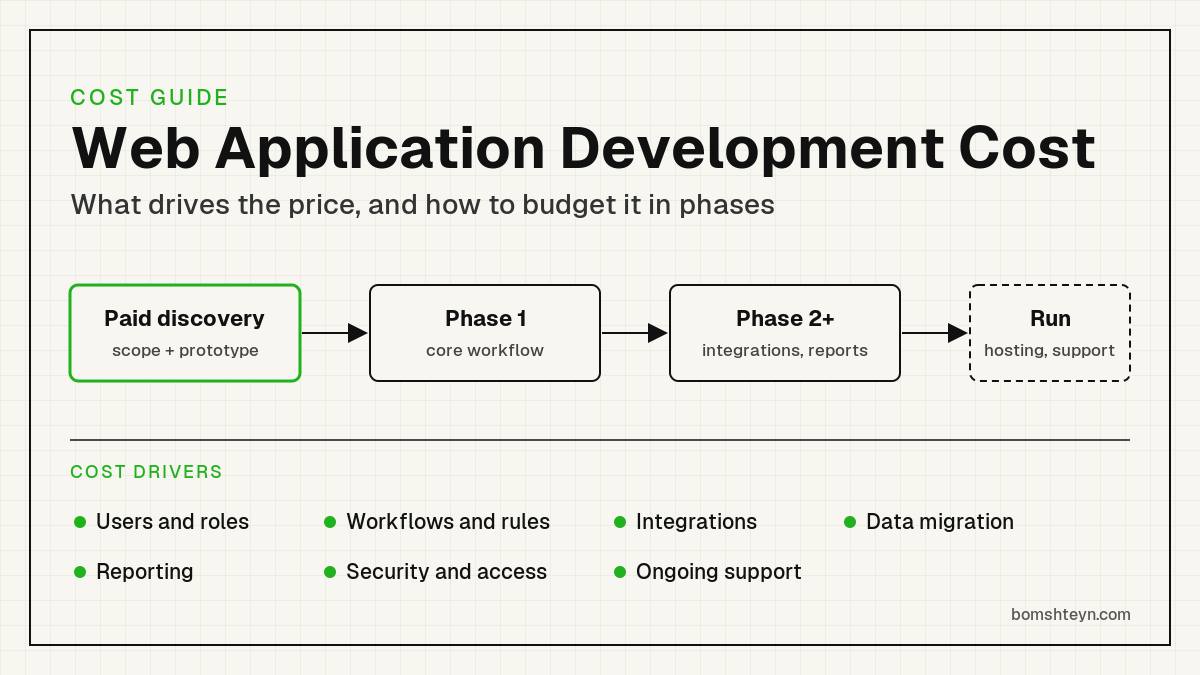
A custom web application is mostly people’s time: understanding the business, designing the screens, writing and testing the code, moving your data, and supporting the system once staff rely on it. Hosting and licences are usually a small part of the total. The price therefore tracks the amount of distinct behaviour the software must handle, not the number of pages it has.
Two applications that look similar in a demo can differ widely in cost. A form that saves a record is quick to build. The same form with approval rules, role-based visibility, an audit trail, an accounting sync and a customer notification is several features, each of which needs to be designed, built and tested.
Budgets also depend on how much is already decided. When you know your users, rules and data, an estimate can be fairly tight. When the project is “replace how we run operations,” most of the early cost is finding out what that means.
The seven main cost drivers
1. Users and roles. Each type of user (staff, managers, customers, vendors, drivers) needs its own permissions, screens and edge cases. A single internal team is simpler than a system shared with outside companies.
2. Workflows and business rules. Approvals, pricing rules, statuses, exceptions and “it depends” decisions are where most effort goes. A workflow your team can explain in one sentence is cheap; one that only lives in a senior employee’s head is not.
3. Integrations. Connecting to accounting, payments, an EHR, payroll, email or a supplier’s system adds work for authentication, mapping fields, handling failures and keeping data in sync. A well-documented modern API is far easier than a desktop product or a system with no API at all. Our system integrations page explains how we approach these connections.
4. Data migration. Moving years of records out of spreadsheets or a legacy database means cleaning duplicates, mapping old fields to new ones and agreeing what to leave behind. It is often underestimated because the mess only becomes visible once someone looks.
5. Reporting. A few fixed reports are straightforward. Flexible dashboards, exports for accountants and figures that must reconcile with another system add up.
6. Security and access. Every application needs sound authentication, permissions and backups. Systems holding health, financial or personal information need more care around access logging, data handling and who can see what, and that care takes time to design and test.
7. Ongoing support. Software that staff depend on needs hosting, updates, monitoring and someone to fix problems. Plan for it from the start rather than treating launch as the end of spending.
Typical project shapes
Without knowing your workflows, nobody can give you a reliable number. The shape of the project is still a useful guide to where it will sit relative to others:
- A focused internal tool: one team, one core workflow, few or no integrations. Replacing a shared spreadsheet with a proper application is a common example. This is the smallest kind of project and is a realistic first phase.
- An operational system: several roles, approvals, an accounting or payment integration and some reporting, such as order management or job tracking. Most of the budget goes to workflow rules and integrations.
- A portal for outside users: customers, vendors or members log in to their own data, which adds account management, stricter permissions and support for people outside your company. Our portal development page covers these in more detail.
- A replacement for a legacy system or ERP: everything above plus data migration, parallel running and retraining staff who know the old system well. These are best delivered in several phases.
Our projects start at US$5,000. Where a given project lands above that depends on the drivers above, which is exactly what a discovery phase is designed to pin down.
Why paid discovery comes first
A short paid discovery is the most reliable way to turn “how much?” into a number you can plan around. The UK government’s service manual on the discovery phase puts it plainly: before you commit to building, you need to understand the problem, the users and the constraints, and you should not start building during discovery.
For a business application, discovery typically maps the current workflow and data, identifies the integrations and their limits, agrees what the first phase must include, and produces a clickable prototype that staff can react to. You come out with a written scope and an estimate for the first phase, and you own the findings whether or not you continue with us.
Discovery also protects your budget. Misunderstandings are cheap to fix on a prototype and expensive to fix in finished code.
Budgeting in phases instead of one big number
Large fixed quotes for a whole system feel safe but rarely are. Requirements change once people start using the software, and every change against a fixed scope becomes a negotiation. The U.S. government’s Digital Services Playbook makes the same point for public projects: it recommends building with agile, iterative practices and structuring budgets and contracts to support that kind of delivery.
In practice we split the work into phases of two to four weeks, each estimated before it starts:
- Phase 1 delivers the core workflow that replaces the biggest pain, such as getting orders out of email and spreadsheets.
- Later phases add integrations, reporting, customer or vendor access, and the second-tier features.
- After each phase you use working software, decide what matters most next, and can pause or change direction without wasting what was built.
This gives you a real ceiling for each commitment and working software early, instead of one large bet at the start. Our rental system modernization case study and buying group vendor portal are examples of the kinds of systems built this way.
Running costs after launch
Budget for the system’s life, not just its build:
- Hosting and infrastructure: servers, databases, backups and email delivery. These are usually modest for business applications with a known user base.
- Third-party services: payment processing, SMS, mapping, AI model usage or paid APIs, typically billed by the provider based on usage.
- Maintenance: security updates, framework upgrades and fixes as connected systems change their APIs.
- Improvements: new reports, workflow changes and features your team asks for once they rely on the system.
Skipping maintenance does not remove the cost; it defers it. Martin Fowler’s explanation of technical debt describes how internal shortcuts make every later change take longer, which is effectively interest paid on the debt. A modest, steady maintenance budget is cheaper than an emergency rebuild.
How to reduce cost without cutting corners
- Start with one workflow. Pick the process that costs the most time or errors today and solve it first.
- Keep the tools that work. If your accounting system or payment provider is fine, integrate with it rather than rebuilding it.
- Clean your data early. Deciding which records and fields matter before migration starts saves rework.
- Name one decision-maker. Projects slow down, and cost more, when every screen needs several approvals.
- Use a proven stack. We build on Laravel, a mature PHP framework, so common needs such as authentication, queues and admin screens do not have to be built from scratch.
- Defer the nice-to-haves. A feature list split into “must have for launch” and “later” is the single most effective budget tool.
If you are still deciding whether custom software is the right move at all, our web application development page explains when it pays off compared with off-the-shelf tools.
Frequently asked questions
How much does a custom web application cost?
It depends mainly on the number of user roles, the complexity of the workflows, the integrations and the data you need to migrate. Our projects start at US$5,000, and a paid discovery phase produces a scoped estimate for the first phase before you commit to the build.
Why won't developers give a fixed price straight away?
Because the cost is driven by details that are not known yet, such as exceptions in your workflow or limits in the systems you connect to. A quote without those details either includes a large buffer or leaves the risk with you.
How long does a web application take to build?
A focused first phase can often deliver working software within a few weeks after discovery. Larger systems are delivered across several two to four week phases, so staff use parts of the system while the rest is built.
Is it cheaper to customise off-the-shelf software?
Sometimes. If a product covers most of your process and you can adapt to it, configuring it is usually cheaper. Custom software makes sense when your workflow is a competitive advantage, when you are paying for many tools that do not talk to each other, or when the off-the-shelf option forces costly workarounds.
What ongoing costs should we expect?
Hosting, third-party services billed on usage, security updates and maintenance, and any improvements you request. Agree on a support arrangement before launch so these costs are predictable.
Your next step
The fastest route to a reliable number is a short conversation about the workflow you want to fix, the systems it touches and who will use it. Bomshteyn Consulting is Canadian-led · serving businesses across the US and Canada, and we build, host and support the systems we deliver. Contact us to start a discovery conversation and we will tell you honestly whether custom software is the right fit and what a first phase would involve.
Selected work
Case studies
DWG · 1 · Distribution & Wholesale
A connected ERP for a wholesale distributor
We replaced a legacy desktop ERP with a portal for purchasing, receiving, inventory, sales and department workflows, connected to third-party warehouse inventory snapshots.
Before
- Legacy desktop ERP used across departments
- Historical records held in CSV files
Portal
- Purchase orders, vendor offers and vendor bills
- Receiving, discrepancy reports and per-container cost baselines
- Inventory lots with FIFO and average landed cost
DWG · 2 · Construction & Logistics
One logistics platform across multiple yards
We connected orders, dispatch, yard stock, drivers, equipment rentals and shipment-based invoicing for a construction supply business with multiple yards.
Before
- Orders, deliveries and returns across multiple yards
- Stock and backorders by warehouse
Portal
- Orders and shipments with job-site deliveries and returns
- Drivers, trucks and job sites with map picker and geocoding
- Per-yard stock, movements, picking and backorder tracking
DWG · 3 · Non-profit & Trusts
Donor management and receipting for charities
We built a donor platform that keeps each charity's branding and receipt sequence together with donations, CRA receipts, year-end packages and reporting.
Before
- Donor and donation records across organizations
- Receipt sequences and sender details
Portal
- Organization branding, sender details and receipt sequences
- Donors, donations, categories, campaigns and tags
- Sequential CRA receipts, legacy flags and voided-receipt watermarks