Custom software development cost depends on the business responsibility you are buying: connecting existing systems, giving customers access, coordinating staff or replacing an operational backbone. A price without that boundary is difficult to compare and easy to misunderstand.
At Bomshteyn Consulting, the minimum engagement is US$5,000. That is a starting point, not a promise that an entire portal, ERP replacement or integration programme fits that budget. Paid discovery establishes what a useful first phase includes and what it excludes.
This guide helps an owner or operations lead prepare a budget across business software types. For browser-interface and web-app-specific considerations, see our web application development cost guide. Here, the emphasis is on operational scope, build versus buy and the full commitment after launch.
Start with the business boundary
Write down what happens today, who makes each decision and which system owns each record. Then describe the smallest change that would genuinely help. “Connect accepted orders to accounting” is estimable in a way that “automate the office” is not.
Bring representative records, an awkward exception and the current workaround. Name someone who can resolve conflicting requirements. Staff time for explaining rules, checking migrated data and reviewing delivered work belongs in your budget even when it does not appear on a developer’s invoice.
Avoid treating every inefficiency as a reason to rebuild. An existing product, a better export or a small connection may solve the problem without a new system.
What changes the cost by project type?
System and API integrations
For QuickBooks, payments or an EHR such as Tebra, the expensive question is rarely whether information can travel between systems. It is what should happen when it arrives late, conflicts with another record or needs correcting.
A reporting feed is different from creating accounting transactions. A payment status lookup is different from initiating a charge or refund. Budget for access approval, field mapping, matching identifiers, duplicate prevention, retries and reconciliation. Confirm API availability and any provider charges before assuming a connection is straightforward.
Ask for a first phase with one defined handoff and a way to inspect failures. Our system integration services distinguish API connections from compatible exports so the scope follows the job rather than the label.
Customer or vendor portals
A portal budget grows with what an outside user can see and do. Viewing an order is different from changing it, uploading documents, approving a quote or managing colleagues’ access.
Identify company boundaries, account recovery, invitations and staff assistance. Decide whether information is live, imported on a schedule or checked before publication. For customer and vendor portal development, estimate a complete journey, such as submitting a request and tracking its outcome, rather than a disconnected list of screens.
Internal workflow tools
Replacing a spreadsheet can be a focused first phase when one team owns the process. Cost grows when different departments disagree on statuses, approvals or reporting definitions.
Choose one work item and follow it from arrival to completion. Include rejection, reassignment, cancellation and missing information. Specify who may override a rule and how that decision is recorded. Leaving those cases until launch does not make them disappear from the budget.
Custom ERP or legacy replacement
ERP replacement combines delivery with business continuity. Historical data, opening balances, stock movements and department dependencies need attention alongside new features. Plan migration checks, training, cutover responsibilities and a fallback if an important reconciliation fails.
Our custom ERP development approach starts with the operation rather than a generic module checklist. The anonymous wholesale distributor ERP case study shows purchasing, receiving, inventory and sales within a department-by-department rollout. It illustrates scope, not a transferable price or savings claim.
Ask which part can move first without breaking the remaining system. Replacing everything at once may create dependencies that a smaller phase avoids.
AI automation with human review
For invoice extraction or reporting assistance, model usage is only one budget line. Include representative input samples, review screens, validation rules, evaluation and handling of uncertain or incomplete results.
Define the human decision explicitly: who checks a draft, what they compare it against and what happens when the result is wrong. Our AI automation services use bounded reporting access or document-to-draft workflows, with people retaining consequential approvals. Test whether ordinary rules or an integration would solve the task before adding AI.
Build versus buy: compare the same years and responsibilities
Start with off-the-shelf software if the process is common and your team can reasonably adopt its workflow. Check permissions, exports, integration access and the subscription tier you actually need. A product demonstration should include your awkward example, not just the vendor’s ideal path.
Use the same planning horizon and currency for both options. A simple worksheet is enough:
- SaaS: seats × monthly price × months per year × years, plus implementation, migration, required add-ons, integrations and internal administration.
- Custom: discovery + phased build + migration and training, plus hosting, maintenance, support, third-party usage and planned changes over those same years.
Calculate SaaS seat costs year by year if headcount changes. Check whether external portal users count as paid seats and whether API access requires another tier. For custom work, confirm repository access, licensing, deployment instructions and the practical cost of handing support to another team.
Add exit costs on both sides: exporting usable records, ending contracts and moving the workflow elsewhere. Do not assume subscriptions stay unchanged or that custom ownership removes operating costs.
Buying is often the better choice when standard functionality is sufficient, the workflow is not distinctive and you cannot allocate someone to own a software project. Custom work becomes worth investigating when essential rules, cross-system handoffs or persistent workarounds are the actual problem. A hybrid can keep accounting in an established product while custom software handles the operational gap.
Budget beyond launch
Separate these responsibilities in the proposal rather than accepting a single unexplained “support” allowance:
- Hosting: application and database capacity, backups, restore checks, storage and monitoring.
- Maintenance: security patches, Laravel/PHP upgrades, dependency updates and changes to connected APIs.
- Support: investigating incidents, helping authorised staff and agreeing availability and escalation arrangements.
- Change requests: new reports, revised approval rules, additional integrations or another department’s workflow.
- Usage charges: payment processing, email, SMS, AI services or other provider fees where applicable.
Ask which costs are recurring, usage-based or separately approved. Define the difference between correcting delivered behaviour and adding a new requirement. Confirm who monitors failures, who restores service and what happens when the original developer is unavailable.
Do not delete testing and maintainability to make two quotes look equal. Martin Fowler’s discussion of software quality and cost explains how poor internal quality increases the effort needed for later changes. That supports asking about automated checks and maintainable code, not promising a particular financial return.
Use paid discovery to buy down uncertainty
Discovery should produce decisions you can use: a workflow map, source-system constraints, data samples, first-phase acceptance criteria and a written estimate with assumptions. Agree the deliverables and fee before starting. Make sure you can retain the findings if you do not proceed.
The GOV.UK discovery guidance recommends understanding users, constraints and alternatives before committing to building. Its context is public services, but the budgeting lesson applies here: stopping after discovery can be the sensible outcome when an existing solution is sufficient.
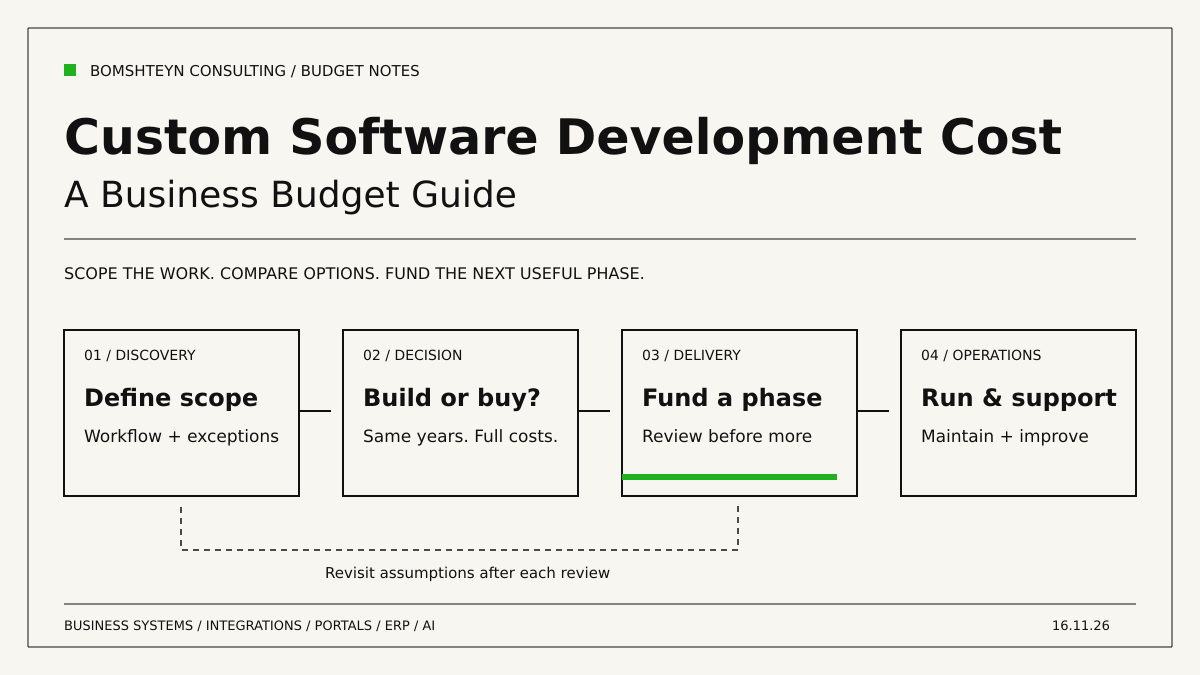
Then fund a useful phase rather than an undefined percentage of a future system. Set its boundary, review date and acceptance examples. Agree how changed assumptions affect the estimate before work begins. After reviewing working software, decide whether to extend, adjust or pause. Phasing limits each commitment; it does not guarantee that the total scope will never change.
Compare quotes with a shared checklist
Send each supplier the same brief and ask for written answers:
- Included outcome: Which workflow will staff complete, and what remains manual?
- Assumptions: Which APIs, data quality, access permissions and client decisions does the estimate depend on?
- Acceptance: How will normal work, empty results, errors and unauthorised access be checked?
- Commercial boundaries: Is the price fixed for an agreed scope or based on time? What requires approval, and how are changes estimated?
- Ownership and handover: Who controls source code, accounts, documentation and deployment access?
- After launch: What maintenance and support are included, excluded or billed separately?
A cheaper quote may omit migration or assume your staff will reconcile records. A higher one may include work you do not need yet. Resolve those differences before comparing totals. Ask for the next phase’s commitment separately from an indicative whole-programme estimate.
Frequently asked questions
What is the minimum custom software development cost?
Our minimum engagement is US$5,000. A complete project’s cost depends on its agreed scope; this minimum is not a fixed package price. Paid discovery determines a realistic first-phase estimate.
Can we keep QuickBooks or our existing EHR?
Potentially. First confirm the required access and whether an API, export or scheduled import supports the workflow. Keeping a working system can avoid rebuilding responsibilities it already handles well.
Is custom software always cheaper than SaaS?
No. Compare the same period, users, capabilities and operating responsibilities. Off-the-shelf software may be the better fit even if a custom build is technically possible.
How do we prepare for an estimate?
Bring a real workflow, sample records, current tools, known exceptions and a decision-maker. Separate essential launch behaviour from later improvements and identify the budget you can commit to the first phase.
Make the next commitment clear
Bomshteyn Consulting is Canadian-led, serving businesses across the US and Canada. Our senior developers in Europe build Laravel/PHP systems. Start with one operational problem, compare buying with building, and use paid discovery to define a phase you can review before committing to more.
Selected work
Case studies
DWG · 1 · Distribution & Wholesale
A connected ERP for a wholesale distributor
We replaced a legacy desktop ERP with a portal for purchasing, receiving, inventory, sales and department workflows, connected to third-party warehouse inventory snapshots.
Before
- Legacy desktop ERP used across departments
- Historical records held in CSV files
Portal
- Purchase orders, vendor offers and vendor bills
- Receiving, discrepancy reports and per-container cost baselines
- Inventory lots with FIFO and average landed cost
DWG · 2 · Construction & Logistics
One logistics platform across multiple yards
We connected orders, dispatch, yard stock, drivers, equipment rentals and shipment-based invoicing for a construction supply business with multiple yards.
Before
- Orders, deliveries and returns across multiple yards
- Stock and backorders by warehouse
Portal
- Orders and shipments with job-site deliveries and returns
- Drivers, trucks and job sites with map picker and geocoding
- Per-yard stock, movements, picking and backorder tracking
DWG · 3 · Non-profit & Trusts
Donor management and receipting for charities
We built a donor platform that keeps each charity's branding and receipt sequence together with donations, CRA receipts, year-end packages and reporting.
Before
- Donor and donation records across organizations
- Receipt sequences and sender details
Portal
- Organization branding, sender details and receipt sequences
- Donors, donations, categories, campaigns and tags
- Sequential CRA receipts, legacy flags and voided-receipt watermarks