
MCP stands for Model Context Protocol: an open protocol that lets AI applications connect to external data and tools through a standard interface. Anthropic introduced it in November 2024. For a business buyer, the practical question is simple: can an assistant answer questions using your actual systems, rather than asking staff to copy information into a chat?
The answer can be yes, with deliberately scoped access. An MCP connection can let an assistant retrieve approved records, explain business data, or request a permitted action. It is not a new AI model, a replacement for your software, or permission to expose your entire database.
This guide explains what you are buying when you commission a connector, what needs to stay under your control, and when a conventional integration is the better choice.
MCP meaning: what does the protocol actually do?
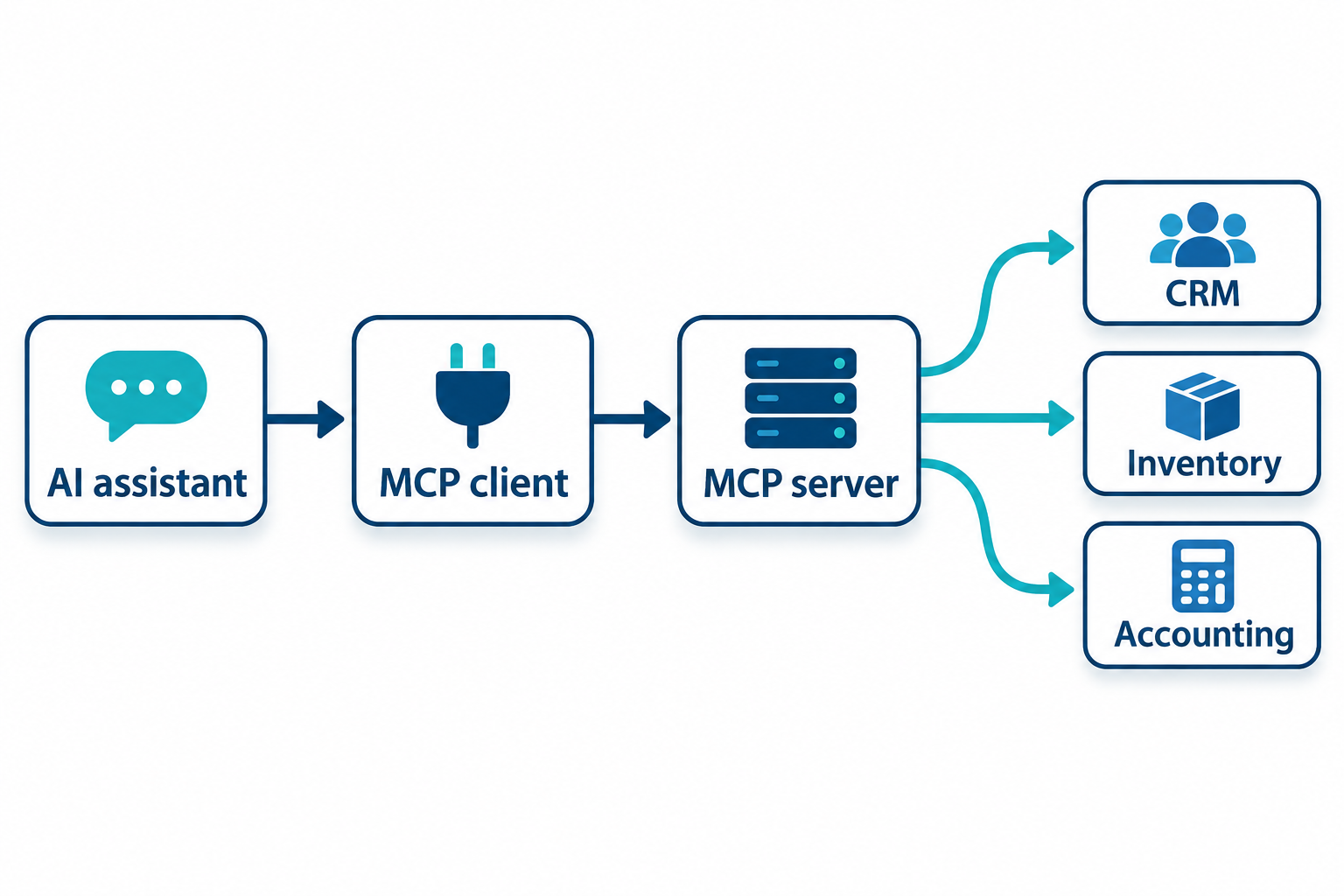
Think of MCP as an agreed way for an AI application and a business connector to communicate. Instead of teaching each assistant a completely different interface for every system, developers can expose capabilities through a common protocol. The underlying business integration still needs to be built or configured.
The official MCP introduction describes connections to data sources, tools and workflows. Its building blocks include tools that perform operations, resources that provide context, and prompts that offer reusable interaction templates. A particular server does not have to implement every capability, and clients differ in what they support.
A typical interaction starts with an employee asking a question. The AI application discovers the connector’s available tools, requests an appropriate operation, receives a result, and uses it to compose an answer. The server should validate the request and enforce access rules before returning anything.
That distinction matters: the model proposes how to use a capability; your application remains responsible for deciding whether the operation is allowed. MCP supplies the communication structure, not the business judgement or data-quality guarantees.
Best for: businesses whose staff repeatedly need information from operational systems while working with an AI assistant.
MCP server vs client: who does what?
An MCP server is a program that exposes selected data or capabilities. It might wrap an existing API, call application services, or query an approved reporting database. Despite the name, it does not necessarily mean buying another physical server.
An MCP client is the component that connects to that server. The host is the AI application coordinating the experience. As the architecture documentation explains, a host can manage multiple clients, each maintaining a connection to its corresponding server.
Servers can run locally or remotely. Local connections can use standard input and output between processes; remote connections can use Streamable HTTP. Deployment choice affects installation, access management and support. A local prototype for one operator is not the same deliverable as a centrally managed connector for multiple employees.
For procurement, ask who owns each layer: the assistant subscription, the connector code, the hosting, the source-system credentials and ongoing maintenance. A working demo does not settle those responsibilities.
MCP vs API vs custom integration
MCP and APIs are not rivals. An API defines how software accesses a system’s functions or data. An MCP server often uses that API underneath, adding an interface that compatible AI applications can discover and call. It does not remove API limits, licensing requirements or missing functionality.
| Approach | Primary role | Best for | What still needs work |
|---|---|---|---|
| Existing API | Expose a system's operations to software | Developers integrating an available service | Authentication, business logic and the user experience |
| MCP server | Expose selected capabilities to compatible AI clients | Conversational access to approved business data and actions | Source integration, permissions, client testing and monitoring |
| Direct custom integration | Connect applications for a defined workflow | Predictable synchronisation or scheduled processing | Error handling, mapping, retries and ongoing maintenance |
Best for predictable automation: a conventional integration when an event should always trigger a defined action. You do not need a language model to copy an approved order into another system.
Best for conversational work: MCP when an authorised person needs to explore data, ask follow-up questions or request one of several bounded operations. Our system integration services cover the underlying connections; AI integration addresses how an assistant uses them.
What about plugins and function calling? A plugin is a product-specific extension mechanism; its capabilities depend on that product. Function calling lets a model propose a structured call to a defined function. MCP standardises communication between a client and a server exposing capabilities. An AI application can use function calling to select a tool, then route the request through MCP. These layers can coexist rather than replace one another.
Business examples: start with the data question

In real connector work for a formal-wear rental business, we have worked with schema discovery and read-only business querying. The important work is not merely making records reachable. The connector needs to explain what those records mean: current inventory status is different from historical pickups, and a recorded adjustment is not automatically a cash refund.
That is a useful model for a first project. Give an authorised operator access to a bounded reporting surface, with definitions that prevent misleading comparisons. Do not assume a plausible answer is correct just because the query completed. This example describes implementation patterns, not a claimed revenue gain or a guarantee of reporting accuracy.
The same design principle can guide other use cases. A service business could retrieve approved job histories before drafting a response. A distributor could expose stock and order-status lookups. A training/education portal could provide permitted course and enrolment information. These are potential applications, not claims that every example is a deployed client connector.
Best for a pilot: a question employees already answer manually, with a known source of truth and a clear way to check the result. Avoid beginning with autonomous payments, irreversible record changes or unrestricted customer-data searches.
For examples of the operational foundations these projects depend on, see our rental system modernisation case study and email-integrated order management case study. These are software delivery examples, not claims that each system includes an MCP deployment.
How can your business connect its systems to Claude or ChatGPT?
Start by confirming the exact AI application, account capabilities and administrator policies you intend to use. The official introduction identifies Claude and ChatGPT among applications supporting MCP, but that does not mean every plan, interface or deployment supports every server feature. Test the intended client rather than promising universal compatibility.
Next, identify the source systems and check whether a suitable existing connector is available. Review its permissions and maintenance before installing it. A connector listed in a directory is not automatically appropriate for confidential business data.
If your workflow is proprietary, a developer can build a server around approved application services or a restricted data-access layer. Prefer narrow operations such as looking up an order or retrieving a reporting summary over exposing arbitrary administration. Where broader reporting queries are necessary, enforce read-only access, limits and careful data boundaries.
Then connect a test environment, authenticate as representative users, and compare answers against established reports. Include ambiguous questions, empty results, unavailable source systems and access-denied cases. The assistant should explain those outcomes, not fill gaps with invented facts.
Finally, decide how the connection will be supported. Someone must monitor failures, revoke access when staff leave, and update the connector when a source API or client changes. Our AI automation services can help define where conversational access ends and a controlled workflow begins.
Is MCP secure?

MCP is not a security certification. It provides a protocol with security and authorisation guidance; the safety of a particular connection depends on its implementation, deployment and operating controls. The official security best practices address risks including token misuse and excessive permissions.
Treat a connector as a new access path into your business. Require these decisions before launch:
- Least privilege: expose only the necessary operations and fields. Begin read-only where practical; read-only access still carries disclosure risk.
- Identity and authorisation: authenticate users and enforce record-level and tenant-level access on the server. A prompt saying “only show my records” is not an access control.
- Credential handling: keep secrets out of chat content and source control. Use appropriate token validation, restricted scopes and revocation procedures; do not casually forward tokens between services.
- Untrusted content: treat retrieved documents and tool results as data, not instructions. Prompt injection can attempt to steer an assistant into disclosing information or taking unintended actions.
- Action controls: require explicit approval for consequential writes, validate inputs independently, and design recovery procedures. Confirmation in a chat is not a substitute for server-side permission checks.
- Auditability: record useful access and error events without unnecessarily retaining sensitive payloads. Test what happens when permissions are removed or a source system fails.
Also review what information reaches the AI provider, how it is retained, and what contractual requirements apply. MCP itself does not decide data residency, retention or regulatory compliance for US or Canadian businesses. Those questions belong in the project scope, not in an assumption that a private connector keeps all data private.
How to get an MCP server built: scope, cost and timeline
A useful discovery brief names the people using the assistant, the questions they need answered, the source systems, the permitted actions and the information that must never be returned. Include examples of correct answers and the reports used to validate them. That gives a developer something testable to estimate.
Ask for staged delivery: assess source access, define tool contracts and permissions, build a bounded prototype, test with representative users, then harden deployment and support. Agree on acceptance criteria before expanding the tool list. An unauthorised request should fail safely; an empty result should be reported honestly.
There is no responsible universal price or timeline. A read-only connection to a documented API has a different scope from a multi-system connector with role-specific access and approval workflows. Legacy data cleanup, missing APIs, compliance review, hosting constraints and stakeholder availability can dominate the schedule.
Separate the initial build from ongoing costs: assistant subscriptions, hosting, monitoring, source-system API charges and maintenance may all apply. Request an estimate with assumptions, exclusions and support ownership, rather than a single number that hides those dependencies.
Best for commissioning custom work: a business with a specific recurring workflow that an existing connector cannot safely support. If you only need occasional document summarisation, a carefully governed upload workflow may be enough.
Frequently asked questions about MCP
What does MCP stand for in AI?
MCP stands for Model Context Protocol, an open protocol for connecting AI applications to external data, tools and workflows. Anthropic introduced it in November 2024.
Does MCP replace an API?
No. An MCP server often calls existing APIs. It adds a standard interface for compatible AI clients, while the underlying API and business rules still do their work.
Can one MCP server work with Claude and ChatGPT?
Potentially, yes. Confirm the features, transport, authentication and account policies supported by each intended client, then test both. Protocol compatibility is not a promise of identical behaviour.
Does connecting MCP train an AI on our database?
The connection itself is not model training. It can send retrieved information to the AI application during use. Review the provider’s applicable data-use terms, retention settings and your own disclosure rules.
Should our first MCP server be read-only?
Often, yes. A bounded read-only pilot lets you evaluate usefulness and answer quality before enabling changes. You still need access controls because reading confidential data can itself cause harm.
Start with one workflow, not your entire business
The right first question is not “How do we add MCP everywhere?” It is “Which recurring task needs trusted business context, and what is the smallest safe connection that helps?”
Bomshteyn is Canadian-led · serving businesses across the US and Canada. We build the underlying business software and integrations as well as the AI access layer. Contact us for a discovery conversation with your source systems, a representative question and your access constraints. We will help determine whether MCP, an existing connector or a conventional integration fits the job.
Selected work
Case studies
DWG · 1 · Distribution & Wholesale
A connected ERP for a wholesale distributor
We replaced a legacy desktop ERP with a portal for purchasing, receiving, inventory, sales and department workflows, connected to third-party warehouse inventory snapshots.
Before
- Legacy desktop ERP used across departments
- Historical records held in CSV files
Portal
- Purchase orders, vendor offers and vendor bills
- Receiving, discrepancy reports and per-container cost baselines
- Inventory lots with FIFO and average landed cost
DWG · 2 · Construction & Logistics
One logistics platform across multiple yards
We connected orders, dispatch, yard stock, drivers, equipment rentals and shipment-based invoicing for a construction supply business with multiple yards.
Before
- Orders, deliveries and returns across multiple yards
- Stock and backorders by warehouse
Portal
- Orders and shipments with job-site deliveries and returns
- Drivers, trucks and job sites with map picker and geocoding
- Per-yard stock, movements, picking and backorder tracking
DWG · 3 · Non-profit & Trusts
Donor management and receipting for charities
We built a donor platform that keeps each charity's branding and receipt sequence together with donations, CRA receipts, year-end packages and reporting.
Before
- Donor and donation records across organizations
- Receipt sequences and sender details
Portal
- Organization branding, sender details and receipt sequences
- Donors, donations, categories, campaigns and tags
- Sequential CRA receipts, legacy flags and voided-receipt watermarks